
YouTube Video ROI Calculator
Calculate the true value of your content by factoring in labor, production costs, and multiple revenue streams.
Video Investment
Revenue Estimates
Valuation Dashboard
💡 Valuation Insight
Not worth it. Rework the strategy. Every video you produce is a financial asset. By reducing your production hours or increasing high-ticket revenue (like sponsorships), you exponentially increase the lifetime value of your content library.
Every Video Costs You Something. Most Creators Never Do This Math.
Every video you make is an investment. You spend hours scripting, filming, editing, and publishing. That time has a real value — whether you're paying an editor, or paying with your own hours that could go somewhere else.
Most creators never calculate whether that investment is actually paying off.
This tool does the math before you commit — so you know going in whether a video is a profit play, a brand-building move, or a time sink dressed up as content.
How the Calculator Works
Enter your production numbers and expected performance. The tool runs three calculations:
Step 1: Total Cost
Total Cost = (Time Spent in Hours × Your Hourly Rate) + Additional Production Costs
Additional costs include anything you paid for: freelance editing, thumbnail design, equipment hire, stock footage, software used specifically for this video. If you produce everything yourself, your hourly rate is the full cost.
Not sure what to enter for your hourly rate? Use what you'd realistically charge someone else for your time. If you'd charge $25/hour for consulting, that's your rate. If you're a student doing this alongside studies, $10–$15 is a reasonable floor.
Step 2: Projected Revenue
Projected Revenue = (Expected Views ÷ 1,000 × RPM) + Sponsorship Value + Affiliate Earnings
RPM (Revenue Per Mille) is how much YouTube pays per 1,000 views after its cut. This varies massively by niche:
- General entertainment: $1–$3
- Gaming: $2–$5
- Education/tutorials: $3–$8
- Finance/investing: $12–$30
- Software/SaaS: $10–$25
- Health and wellness: $5–$15
If you don't know your channel's RPM, find it in YouTube Studio → Analytics → Revenue → RPM.
Sponsorship value — if this video has a dedicated sponsor or integration, enter the deal value here.
Affiliate earnings — if you're linking to products, enter a realistic estimate based on your historical affiliate conversion rate × expected clicks × average commission.
Step 3: Profit and ROI
Profit = Revenue − Cost
ROI % = (Profit ÷ Cost) × 100
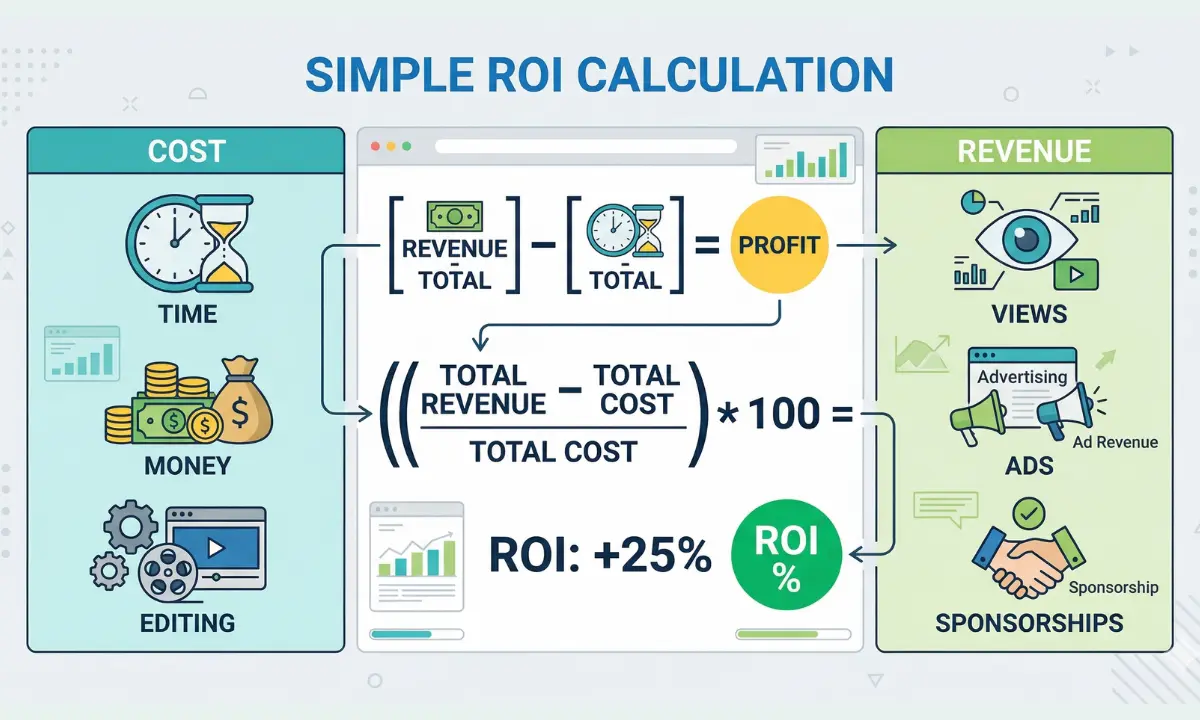
A positive ROI means the video pays for itself and then some. A negative ROI means you're subsidizing the video with your time or money — which is sometimes fine (brand building) but should always be a conscious choice, not a surprise.
The Three Scenarios
Because video performance is uncertain before you publish, the tool lets you model three scenarios:
Low Scenario Your video underperforms. Maybe the thumbnail misses, maybe the algorithm doesn't pick it up, maybe you misjudged the topic demand. This is your floor — what happens if things don't go your way.
Use this to answer: Can I absorb this outcome if the video flops?
Average Scenario Based on your channel's recent average performance. This is the most realistic projection for most videos. The tool uses your stated expected views as the base here.
Use this to answer: Is this video worth it at my typical performance level?
Viral Scenario What happens if the video significantly outperforms — 5x or 10x your average views. This isn't just optimistic fantasy; it's useful planning. Some video types have genuine viral ceiling potential. Others don't.
Use this to answer: What's the upside if this hits?
Running all three scenarios gives you a realistic range rather than a single number that could be wrong in either direction.
Two Types of Videos — Know Which One You're Making
Not every video needs a positive ROI to be worth making. But you need to know which type of video you're creating before you make it.
Profit Videos
These are directly revenue-generating: high RPM niche content, sponsored integrations, affiliate-heavy tutorials, lead generation for a product or service. You make these because they pay. Judge them by ROI %.
Pass-Through Videos
These build brand, audience trust, topical authority, or channel momentum. They may not be profitable in isolation — but they make your profitable videos more valuable by building the audience that watches them.
The mistake most creators make: treating every video like a profit video and getting frustrated when the numbers don't add up. Or treating every video like a pass-through and never building a financially sustainable channel.
The tool shows you which category your video lands in — and whether the ROI math supports the decision you're about to make.
The Vlogger Burnout Problem (Why This Tool Exists)
There's a specific pattern that leads to creator burnout: spending 20+ hours on a video, publishing it, seeing it earn $4.70 in ad revenue, and questioning everything.
That math was always bad. The problem isn't the result — it's that the creator never ran the numbers before spending the 20 hours.
A video that takes 25 hours to produce, earns $40 in ad revenue, and has no sponsorship or affiliate angle has a deeply negative ROI — and that's obvious before you make it, if you look. The decision then becomes: is this video worth making anyway for the brand value? Maybe. But it should be a conscious choice.
This tool forces that conversation before you're 15 hours into production.
The Realistic RPM Benchmark by Niche
One of the most common mistakes in this calculation is using the wrong RPM. If you haven't checked your actual RPM in YouTube Studio, here are realistic ranges to estimate from:
| Niche | Typical RPM Range |
|---|---|
| General entertainment | $1 – $3 |
| Gaming | $2 – $5 |
| Lifestyle / vlogging | $2 – $5 |
| Education / explainers | $3 – $8 |
| Health & fitness | $5 – $15 |
| Tech reviews | $5 – $12 |
| Software tutorials | $10 – $25 |
| Finance / investing | $12 – $30 |
| Legal / professional services | $15 – $35 |
Finance and software channels earn dramatically more per view than entertainment channels — which is why a finance creator with 50k subscribers often out-earns a gaming creator with 500k subscribers.
If you're choosing between niche directions, the RPM difference is worth factoring into that decision.
When Negative ROI Is Still the Right Answer
A video with negative financial ROI is sometimes exactly the right video to make. Specifically:
Topical authority videos — A video that establishes you as the definitive resource on a specific topic builds long-term SEO value that compounds over time. The initial ROI may be negative; the long-term value is significant.
Audience trust videos — Some videos are about showing your audience who you are, what you stand for, and why they should keep watching. These don't monetize directly but they reduce churn and deepen loyalty.
Portfolio or sample videos — If you're using YouTube to attract brand deals, consulting clients, or speaking opportunities, some videos function as proof of expertise. Their ROI is measured in opportunities, not ad revenue.
The tool flags when you're in negative ROI territory — but the decision about whether that's acceptable is yours. At least you're making it with eyes open.
Frequently Asked Questions
What if I don't have an hourly rate — I'm just a hobbyist?
How do I estimate expected views for a new video?
Can I use this for sponsored content deals?
My RPM changes a lot — which number do I use?
What counts as a "production cost" besides time?
Related Tools on Voxtly
- Subscriber Conversion Rate Calculator → — See if the views this video generates are converting to long-term subscribers
- Videos to X Subscribers Estimator → — Build a milestone plan around the videos that make financial and strategic sense
- CTA Effectiveness Scorer → — Maximize the subscriber yield from every video you decide is worth making